.png)
.png)
Summary
- Visual Style Breakdown: Analyzing how popular YouTube channels like Fern and LEMMiNO uses isometric diorama perspectives, matte textures, soft studio lighting, and smooth camera moves to visualize complex topics.
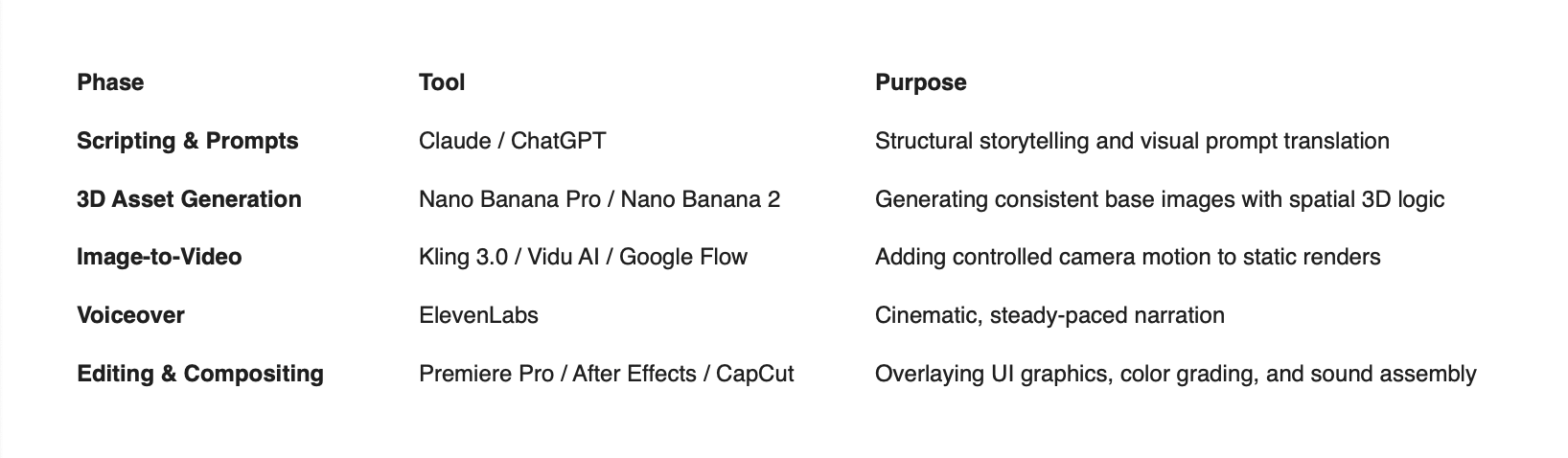
- AI Production Stack: Details a complete toolkit pairing Claude/ChatGPT (scripting), Nano Banana Pro (3D spatial rendering), Kling/Vidu (image-to-video), and ElevenLabs (narration).
- Step-by-Step Workflow: Guides readers through turning scripts into visual prompts, generating consistent 3D base images, animating with low-motion camera passes, and applying tactile sound design.
- Advanced Techniques: Shares strategies for maintaining visual continuity across long videos using "Anchor Visuals," strict color palettes, and post-production 2D graphics overlays.
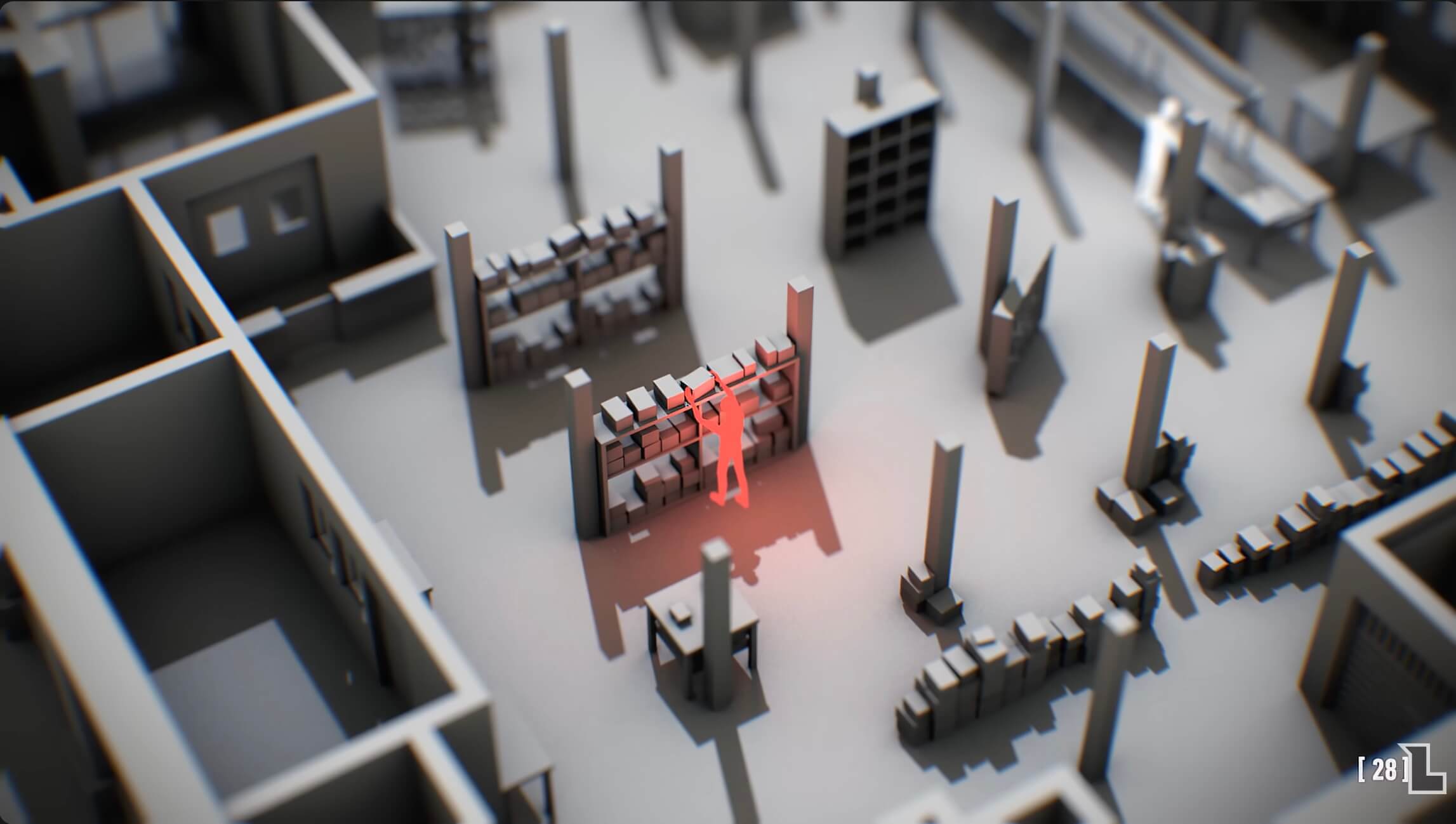
YouTube channels like fern and LEMMiNO ave perfected the "armchair documentary." And this style has increasingly grown in popularity: isometric diorama renders, 3D mannequins, and cinematic studio lighting to explain complex topics where traditional stock footage fails. Historical air crashes, clandestine FBI operations, and intricate global supply chains come alive through custom 3D scenes. In the past, producing just a single 10-minute video of this quality level would have required a team of Cinema4D artists and a budget in the tens of thousands of dollars. Today, anybody with an artistic vision can replicate this Netflix-level of quality with the right AI tools.
Before we start, I want to be clear that in a sea of AI slop and low effort content, the last thing we need is a flood of copycat channels that emulate another creator's style 1:1. I feel it's worth stating upfront that I don't advocate for copying other creators. Do not steal video ideas from channels like fern and LEMMiNO without adding your unique perspective and artistic choices. Similarly, I disavow copying other people's artistic style without permission, I disavow cloning voices without consent, and I disavow plagiarizing video scripts and video ideas without adding any additional value.
All that being said, I still think AI is an incredible tool that can democratize creativity, enable small teams to take on ambitious projects, and sginificantly lower barriers to entry for content creation and creative fields - when used responsibly, with good intentions, and with discerning taste. Now, let's get into it.
Deconstructing the 3D Documentary Visual Style
Before making assets, it's important to understand the visual elements that make this style work:
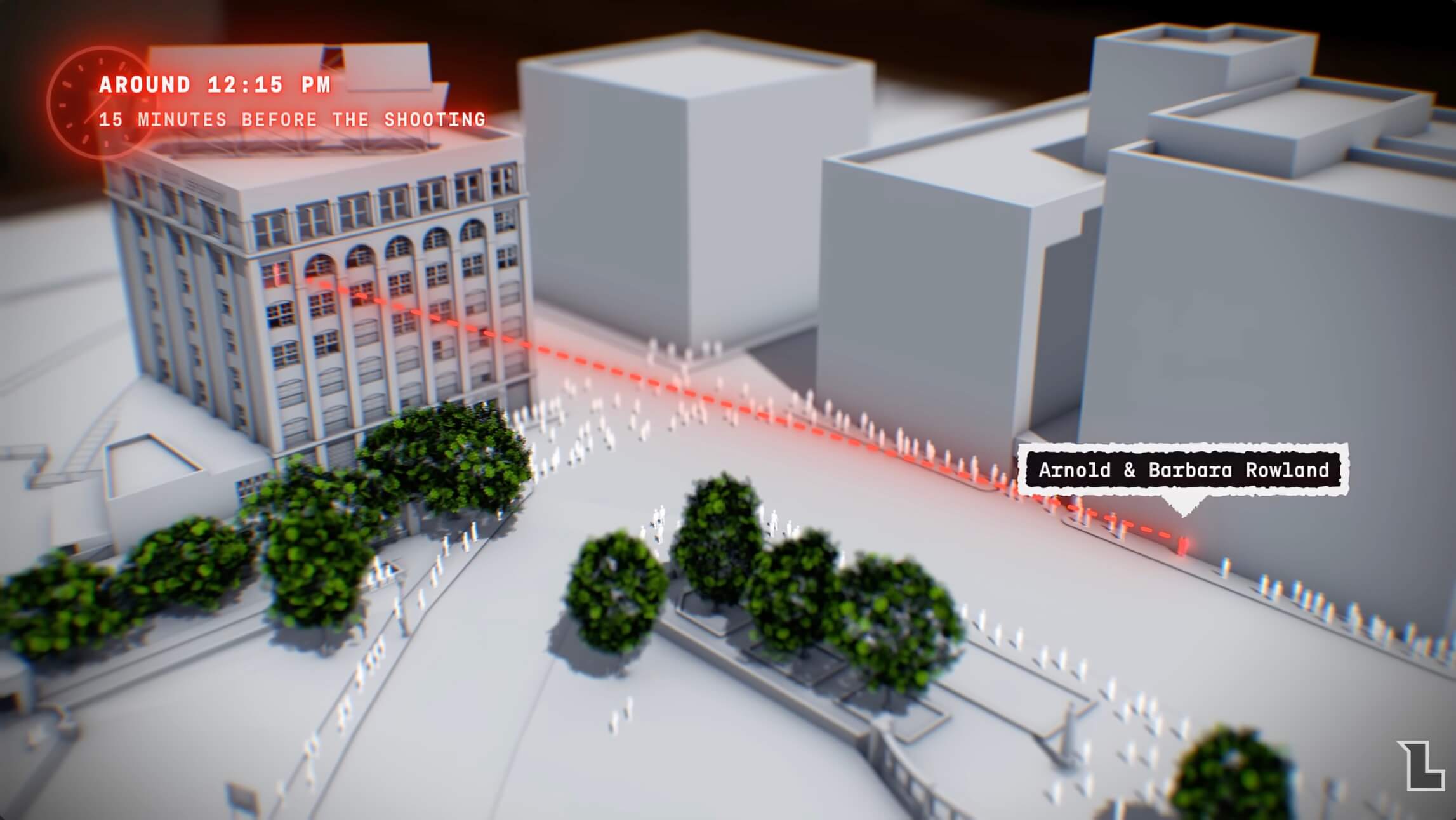
- Isometric & Diorama Perspectives: Scenes are framed as miniature, self-contained slices of reality—often with a cutaway view showing internal machinery, rooms, or geographical cross-sections.
- Matte Textures & Soft Lighting: The look avoids glossy hyper-photorealism, relying instead on matte clay or resin textures, soft ambient occlusion, directional key lights, and deep orange-teal color grading.
- Deliberate Camera Motion: Motion comes from slow, linear camera moves (dolly pushes, subtle tracking shots) through a static or near-static 3D space.
- Visual Cohesion: Lighting, palette, and asset fidelity remain identical across every scene, creating the illusion of a single continuous render engine.
The Full AI 3D Video Production Stack
To maintain creative control across a long video, build your pipeline using specialized tools for each phase:
Step-by-Step Workflow: From Script to Render
Step 1: Scripting for Visual Translation
Divide your script into a two-column format: Audio (Voiceover) on the left and Visual (3D Scene Description) on the right.
Prompt your LLM to act as a 3D Art Director. Feed it your script and instruct it to extract key visual concepts every 5–10 seconds.
Prompt Example: "Read the following documentary script segment. Convert each 10-second block into a detailed prompt for an isometric 3D render. Specify subject placement, diorama boundaries, studio lighting, matte textures, and cinematic depth of field."
Step 2: Generating Cohesive Base Images with Nano Banana or Midjourney
If there's one thing you take away from this guide, let it be this: never attempt to generate a full video directly from text. You will end up with an unmistakably AI-generated mess with inconsistent characters, visual morphing, and other AI artifacts - at least with the models we have available today. Text-to-video models cause severe visual morphing and lack consistency across shots. Instead, generate static 3D base images using Nano Banana Pro or Midjourney.
- Establish a Master Style Prompt: Include consistent parameters across all queries.
- Master Anchor:
"3D isometric diorama, matte clay finish, volumetric studio lighting, teal and dark slate background, octane render style, soft shadows, low-poly miniature model, ultra-detailed textures, cinematic composition."
- Master Anchor:
- Maintain Style Continuity: Utilize Nano Banana's reference features. Upload your first successful 3D render as the style seed. When generating subsequent scenes (e.g., an airport hangar after a flight control center), force the model to reference the lighting temperature, clay texture, and palette of the initial image. In Midjourney, you can create personalized taste profiles by manually curating reference photos. I've found that this can deliver some extremely high quality results that avoid the characteristially "AI look."
Step 3: Animating the Renders with Image-to-Video
Import your Nano Banana or Midjourney base images into an image-to-video generator like Kling, Vidu AI, or Google Flow.
- Set Motion Speed Low: Restrict motion intensity parameters to 15–25%. High motion values introduce unwanted morphing artifacts, and generally makes things feel unnatural and AI-sloppy.
- Focus on Camera Controls: Use directional prompts to try to emulate real camera equipment:
"Slow linear dolly push toward central structure, static subjects, 24fps motion blur.""Smooth left-to-right camera pan across isometric city block, camera moves, objects remain still."
Step 4: Layer in Sound Design
AI-generated video clips typically contain no audio. Sound design can dramatically elevate your final product, especially for documentary style videos. If you've ever seen a Johnny Harris, Nexpo, or Barely Sociable video, you've likely seen the impact of sound design in action. It adds a level of physical weight and emotion that's necessary for great story telling.
- Tactile Foley: Layer mechanical clicks, soft motor hums, and hydraulic air releases when showing machinery or UI elements.
- Cinematic Ambiance: Place sub-bass hits (low-frequency impacts) on major scene transitions, accompanied by subtle room tone or atmospheric drone.
- Voiceover Alignment: Generate narration via ElevenLabs using an authoritative, measured tone. Align visual cuts precisely to pauses in the voiceover cadence.
- Learn Sound Design: If you're taking video creation seriously, it's worth investing some time into learning sound design as it relates to storytelling. Search for sound design tutorials on YouTube as a good starting point - no need to spend weeks on this though.
Step 5: Post-Production UI and Compositing
To elevate raw AI clips into a polished documentary, composite 2D graphics over the 3D backgrounds in post-production:
- 2D Callouts: Add motion-tracked arrows, distance measurements, coordinate grids, and glowing highlight boxes over key objects.
- Trimming Morphing Artifacts: Hard-cut clips at the 3-to-4 second mark. AI video models typically degrade or warp beyond 5 seconds of generation.
Advanced Strategies for Long-Form Retention
- The Anchor Visual Technique: Create a recurring primary model - such as a large 3D map room or a central control desk - that you return to between subtopics. This re-orients the audience and establishes structural anchors across a 15-minute video.
- Strict Color Math: Standardize your color palette (e.g., dark navy
#0A1118, warm amber#FF9F1C, slate gray#2B3A41). Enforce these hex codes or color descriptors in your base image prompts to prevent random color shifts between scenes.
Testing this pipeline on a 60-second teaser allows you to fine-tune your Nano Banana or Midjourney styles before scaling production to a full-length documentary.