The biggest fear of any migration is losing your Google rankings overnight. I treat SEO protection as non-negotiable - every redirect is mapped, every meta tag is preserved, and every page is submitted for re-indexing post-launch so your organic performance stays intact and improves over time.
Squarespace to Webflow
Squarespace was a fine starting point - but you've outgrown it. I migrate your site to Webflow so you can finally have the design flexibility, SEO control, and performance your brand actually deserves.

Satisfaction guaranteed.
I work until you love the final product.

One man, full-service.
Everything modern businesses need, done right the first time.

Fast turnaround.
Launch in weeks, not months.
Why elite companies trust me
∞
Scalability & independence. I build using Webflow, Figma, and other no-code platforms so your team isn't held hostage by complexity.
2.5x
Avg. conversion increase. Performance-minded, well-designed websites & design systems optimized for results.
70%
Faster GTM. No-code platforms like Webflow and AI-augmented workflows mean I help you start seeing ROI fast.
Convert from Squarespace to Webflow in just weeks.
They might not say it, but customers can tell when a website was made in Squarespace - and it harms your image. If you're serious about growth, migrating from Squarespace to Webflow will immediately position you up there with the big dogs - maybe even above them.
1
Zero SEO Equity Lost
2
Fully Custom Redesign, Not a Rebuild

Most migration services do the bare minimum - move your content over and call it done. I use the migration as an opportunity to rethink your site's structure, improve its visual design, and optimize every page for conversion. You're not just switching platforms. You're leveling up.
Hands-On Transition Support
3
After launch, you're not left on your own to figure out a new platform. I walk you through Webflow's editor, CMS, and publishing workflow so your team can hit the ground running - no developer required for day-to-day updates.
3X
Avg. improvement in page load speed when migrating from Squarespace to Webflow's AWS-hosted infrastructure
55%
Of small business websites built on template platforms fail to rank for their target keywords due to poor technical SEO infrastructure
10X
Cost savings in agency fees reported by brands that switched to Webflow's visual development platform
The Process
How it Works
Site Audit & Migration Plan
I audit your current Squarespace site - pages, content, SEO metadata, media assets, and integrations - then build a migration roadmap that accounts for everything.
Content Export & Preservation
All of your content is carefully exported, organized, and prepared for migration - including blog posts, images, and any structured data - so nothing is lost in the move.

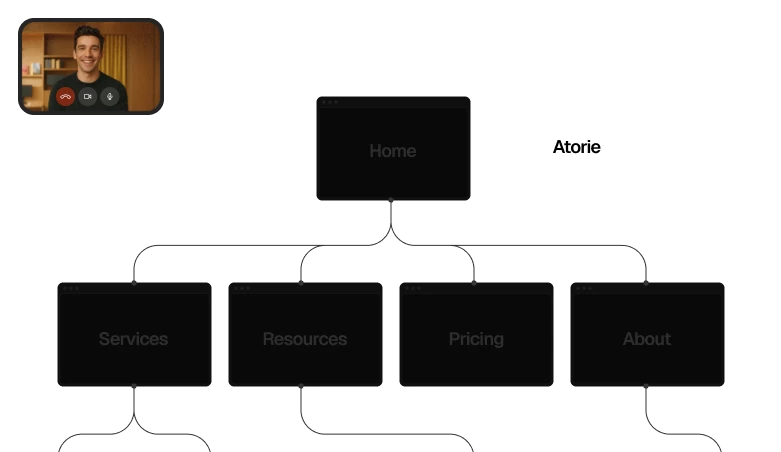
Webflow Design & Rebuild
Your site is redesigned and rebuilt natively in Webflow. This isn't a 1:1 copy - it's a meaningful upgrade in design quality, performance, and structure.
.jpg)

"James proved to be an extremely driven and creative individual with an excellent eye for design and a willingness to assist in multiple facets. He was a great addition to the team and has all the tools to succeed wherever he goes next."
Bret Giles, Co-Founder of Sitewire and Professor of Marketing at Arizona State University
301 Redirects & SEO Protection
Every old URL is mapped to its new Webflow equivalent with proper 301 redirects, protecting your search rankings and ensuring zero broken links post-launch.
.png)
Launch & Post-Migration QA
Pre-launch testing across all devices, final SEO audit, DNS transfer, and a post-launch review to confirm everything is indexed and performing correctly.
%20(1).jpg)
Squarespace Got You Started. Now It's Getting in the Way.
quarespace is a great first website. But at some point - usually right when your brand starts gaining real traction - you run into its walls. The design customizations you need aren't possible. The SEO controls are too shallow. The CMS can't handle your content needs. And every workaround makes the problem worse. If this sounds familiar, you're ready for Webflow.

"I can't get my site to look the way I'm envisioning it."
Squarespace templates are built to look a certain way, and fighting them is a losing battle. What you're imagining is only possible with pixel-level design control - which Webflow gives you.
"My Squarespace site isn't ranking and I don't know why."
Squarespace's SEO tools are surface-level at best. Without control over technical SEO, structured data, and site speed, you're leaving rankings, and traffic, on the table.
"Every time I try to customize something, I break something else."
Squarespace's visual editor was built for simplicity, not flexibility. Once you're past basic changes, you're fighting the platform instead of building your brand.
What you get
Turn your website into a growth asset
Deliverable 1
Website strategy workshop
We analyze your funnel, competitors, positioning, and conversion data to define messaging hierarchy, page structure, and the systems you'll need. You'll know exactly what each page needs to achieve, and why, before we touch design.
Clarity / 90-minute deep strategy workshop
Autonomy / 60-minute structure alignment workshop

Deliverable 2
Conversion-optimized design
Your strategy becomes high-fidelity design, structured for conversion, not just aesthetics. Each page system includes custom layouts, component design, and a complete messaging framework with copy direction, structure, and guidance your team or copywriter can execute immediately.
Clarity / Design with messaging framework system
Autonomy / Design following existing messaging structure
Deliverable 3
Website developed in Webflow
Your website built so marketing can run it. Component-based system, intuitive CMS structure, and page templates your team can duplicate and launch without touching code. No more dev tickets for landing pages.
.avif)
Deliverable 4
Handoff with live walkthrough
Live workshop to setup your team for success with Webflow and all connected platforms (tier dependent), plus lifetime access to recorded guides, component documentation, and workflows. Your team leaves knowing exactly how to launch pages, update content, and maintain the system independently.

Same Brand. Better Platform. Better Everything.
Migrating from Squarespace to Webflow isn't just a technical move - it's a strategic one. You'll have more design freedom, better SEO infrastructure, faster load times, and a site your team can actually manage without calling a developer. The only question is why you waited this long.